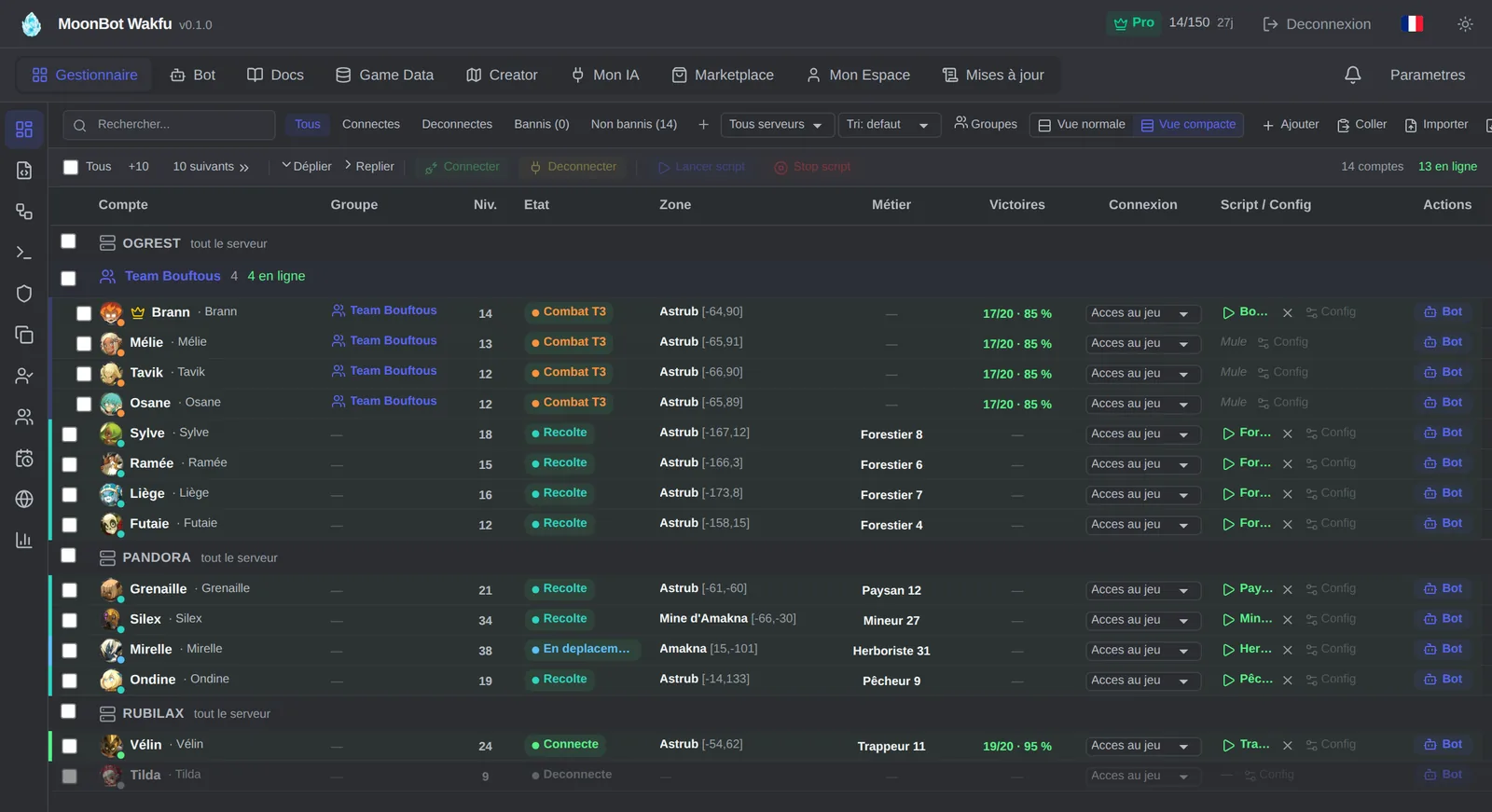
MoonBot now runs bots on Wakfu, Ankama's MMORPG. The principle is the same as for Dofus: it is a cloud bot. Your characters play on our servers and you follow them from your browser, with nothing to install. This guide takes stock of the Wakfu bot as it works today: what you need to launch it, what it automates, how to write your scripts, what it costs and what it does not do.
Everything below describes the app as it was online on November 12, 2026. The bot changes fast: every new feature is listed in the app's "Updates" tab. To see the interface in action and the full pricing grid, visit the MoonBot Wakfu bot page.
What you need to launch a Wakfu bot
- A MoonBot account, created on wakfu.moon-bot.io. Signing up is free.
- An Ankama account with a Wakfu character. MoonBot currently works on the Ogrest, Pandora and Rubilax servers.
- One proxy per game account. This is mandatory: without an assigned proxy, the account does not connect. You can use your own, provided it lets the game's ports through (a web-only proxy will not do), or buy a "Proxy France" or "Proxy Espagne" in the app's Shop: €2.20 per month, less with the Standard, Pro and Expert plans.
- The Ankama Shield code, if the account is protected: you type the code received by email into the bot's Chat tab. With app-based two-factor authentication, you can save the secret once for later connections.
MoonBot does not require a game subscription to launch a bot. Only heroes need an active Booster on the account, as in the game.
What the Wakfu bot automates today
| Feature | What the bot does | Good to know |
|---|---|---|
| Combat | Starting position, priority target, movement, range and up to 12 spell rules per character, or a combat AI written in Lua | The rule-based AI plays offensive spells; support spells go through a Lua AI |
| Gathering | Goes to the nearest resource that the character's ticked professions can gather | Stops after 5 minutes with nothing to gather |
| Crafting | Walks to the workshop, picks the recipe and the quantity, then crafts | Workshops placed in a Haven Bag are not supported |
| Account chest | Deposits, withdrawals and emptying the bags | No guild chest |
| Marketplace | Search, purchase, listing, listing removal and sale proceeds | Tab available from the Standard plan; you sell from the tab or by script |
| Groups | A leader runs the script, its mules follow and join its fights | 6 characters at most, heroes included, on the same server |
| Dungeons | Room-by-room run, resumed after a disconnection | A defeat suspends the run |
| Travel | Zaaps, Drago-Express and boats for long trips | Zaaps and Drago-Express need a destination you have already discovered |
| Connection schedule | Fixed time slots, or hours that change every day | In a group, it is set on the leader |
| Reconnection | Reconnects; the script then resumes on its own, from its last saved step or from the start | No resume after a requested stop or a safety stop |
| Discord alerts | Private messages received, script stopped, bot stopped, defeat, full bags | 6 alerts per hour at most, per account and per type |
On top of that come the world map and the MapViewer, where a right-click is enough to gather, attack a group of monsters or open a chest, per-bot statistics and a filterable console.
Combat: spell rules or a Lua AI
Combat is set per character, in the Combat tab. You choose the priority target (damage per AP, nearest enemy or enemy with the fewest HP), the movement (move to attack or stay in place) and the range (melee, ranged or automatic), then up to 12 spell rules: the first usable rule is played. With no rule, the bot picks its spells itself. The starting position, summons and the account's heroes can be controlled too.
This rule-based AI plays offensive spells. To go further, with support spells or your own conditions, you write a combat AI in Lua: a fightManagement() function, called on each of your turns and independent of the route script. Four starter templates are provided, and your AI library is shared between your accounts.
A safeguard prevents fights that drag on: by default, an alert at 10 rounds, then a forfeit at 20 rounds and at least 180 seconds with no outcome. A forfeit counts as a defeat.
Gathering and professions
Automatic gathering starts from the character's Professions sheet: Lumberjack, Herbalist, Miner, Farmer, Fisherman or Trapper. You tick the professions to use; the bot goes to the nearest resource, within a radius of 30 cells, and picks the action that gives the most XP, one resource at a time, with pauses. The Trapper also gathers from defeated monsters, and planting is supported.
In a script, map.gather gathers the resources around the character and stops in combat or when a bag is full; one mode only keeps the gathers that still give profession XP. Two limits to know: a resource already taken by another character is skipped, so several bots on the same spots get in each other's way, and full bags immobilise the character, and its group with it, until the pending items are put away.
Groups, heroes and dungeons
A group brings together a leader and its mules, 6 characters at most, heroes included. Only the leader runs a script: the mules follow it on the map, take its doors and its transports and join its fights. An account can also play up to two heroes.
For dungeons, the Creator offers a "dungeon run": you add the rooms and the doors, choose a combat profile per room, then assign the script to the leader. After a disconnection, the run resumes from the saved progress.
Lua scripts, Creator and Marketplace
Scripts are written in Lua 5.4, one script per account. The API counts more than 750 functions and aliases: combat, map and gathering, inventory, professions, chest, marketplace, group, dungeons, Haven Bag. It is documented in the app's Docs tab, with autocompletion in the editor. The library files your scripts in folders, keeps the versions of each script (30 by default) and a 30-day recycle bin.
Not keen on writing code? The Creator turns a route drawn on the map into a Lua script: you place the steps (movement, gathering, combat, door), choose the professions, the monsters and the number of passes, and the script is ready to run or to edit in the editor. A route holds 400 steps at most, and the number of exports per day depends on the plan: 1 on Free, 10 on Beginner, 20 on Standard, unlimited on Pro and Expert.
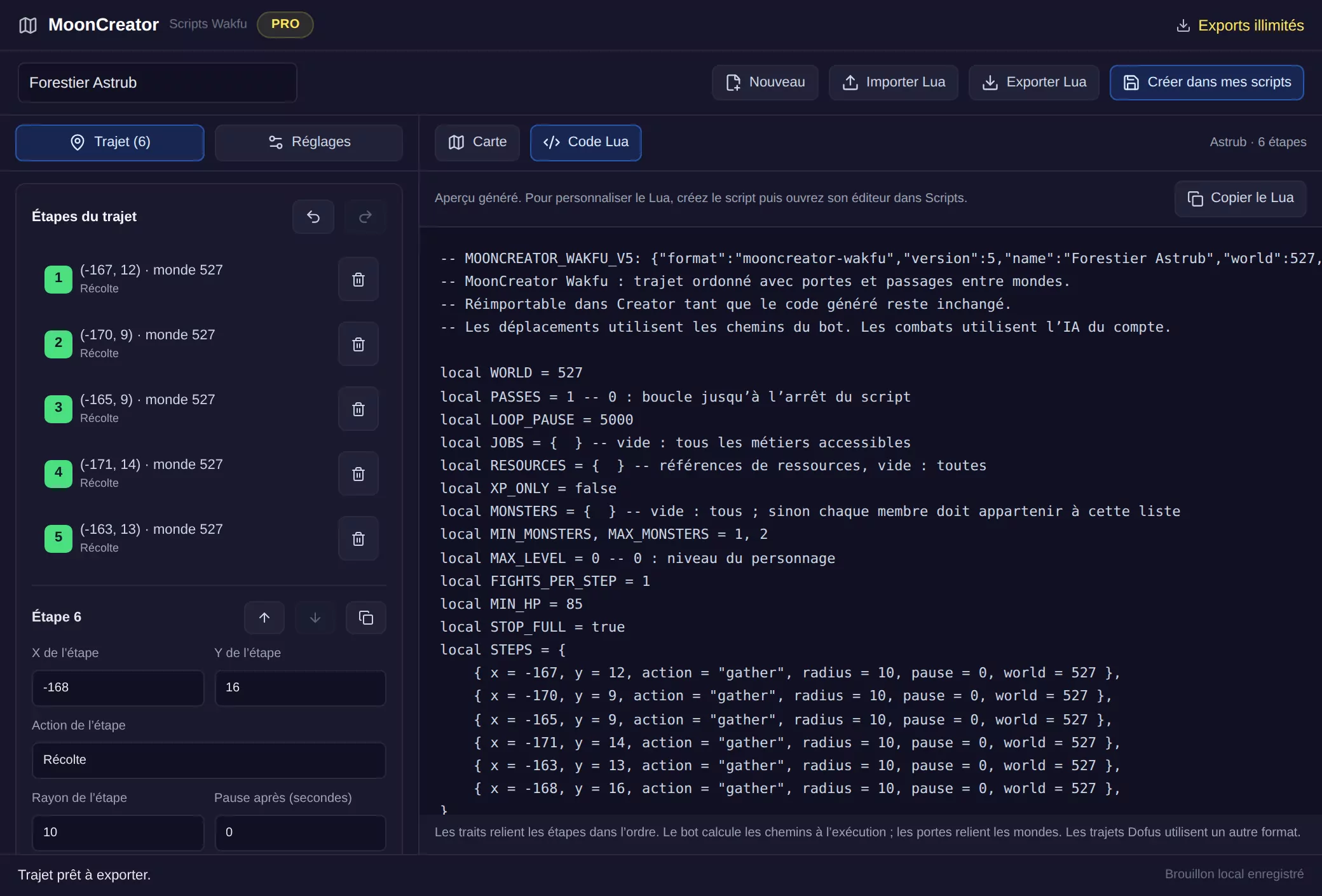
Finally, the app's Marketplace hosts the scripts that users publish, with the code visible or hidden, as their author chooses.
"My AI": control your Wakfu bots with Claude or ChatGPT
The "My AI" tab gives an MCP connector link, https://wakfu.moon-bot.io/mcp, to paste into Claude, ChatGPT, Claude Code, Codex, Cursor, VS Code or Gemini CLI. Once you have confirmed the connection in MoonBot, your AI has about sixty tools: reading the status and logs of your bots, writing, fixing and testing your Lua scripts, connecting an account, starting or stopping a script, searching the documentation and the game data.
Two things to know. First, it acts right away, with no validation inside MoonBot: it is your AI that asks you for confirmation, according to its own settings. Saved changes can be undone from the "Activity" log; in-game actions cannot. Second, some actions are closed to it: it can neither add nor delete an account, nor add a proxy, nor delete a character, and MoonBot never passes your passwords on to it. The number of actions per day depends on the plan: 2,000 on Free and Beginner, 8,000 on Standard, 20,000 on Pro, unlimited on Expert.
Plans and prices
| Plan | Price per month | Bots at the same time | MoonBot proxy, per month |
|---|---|---|---|
| Free | €0 | 1 bot for every 5 validated Discord invites, 5 at most | €2.20 |
| Beginner | €29 | 15 | €2.20 |
| Standard | €87 | 50 | €2.00 |
| Pro | €187 | 150 | €1.80 |
| Expert | €340 | 300, then €0.70 per extra bot | €1.60 |
Plans come with no commitment and cost 30% less when paid yearly. The Marketplace tab starts with the Standard plan. On the free tier, there is no starting bot: each bot is earned through invites, and the dashboard shows a waiting screen from time to time. Each version of MoonBot (Wakfu, Dofus Retro, Dofus Touch, Dofus 3) is subscribed to separately. The full grid is on the Wakfu bot page.
What the bot does not do
- No automatic selling by setting. At the marketplace, you sell from the tab or by script.
- No return to the chest by setting. In a script, the deposit happens when you ask for it, with
bank.depositAll. - No guild chest, and workshops placed in a Haven Bag are not supported.
- No automatic return after a KO. After a defeat, the character stays KO until you, or your script, ask for the return.
- No heroes without a Booster. The game refuses heroes on an account with no active Booster.
Botting breaks the terms of use of Wakfu and exposes your accounts to sanctions. MoonBot is independent third-party software, not affiliated with Ankama: you use it at your own responsibility.
Wakfu and Dofus: the same MoonBot?
The same team, the same interface and the same principle: bots in the cloud, Lua scripts and your AI plugged in through MCP. The engine, however, is written for Wakfu, and Dofus routes use another format: a Dofus script does not run as is on Wakfu. If you also play Dofus, see what MoonBot automates on Dofus 3, the Dofus Retro bot page and the Dofus Touch bot page.
How to get started
- Create an account on wakfu.moon-bot.io.
- Add a Wakfu account and assign it a proxy.
- Connect the bot, and type the Ankama Shield code if the game asks for it.
- Set up combat, or tick the professions to gather with.
- Run a script: your own, a route drawn in the Creator, or ask your AI for one.
A question along the way? The MoonBot Discord is there to help.


