On World of Warcraft: Forever, "playing several accounts" covers two very different things. Multiboxing is a player controlling several accounts at once by hand, one window per character. Multi-account play with a bot means characters that play on their own, each with its script. This guide starts with what Blizzard's rules say about each, then shows how MoonBot WoW runs several WoW Forever accounts from a single screen: the Manager, proxies, groups, prices per account and limits.
Everything below describes the app as it is online on November 17, 2026. For the big picture of the bot (what it does in game, what it cannot do yet), read the WoW Forever bot guide.
Multiboxing on WoW Forever: what Blizzard says
- Playing several accounts by hand. According to Blizzard's support article on multiboxing, as quoted by the site Kami Labs, playing multiple World of Warcraft accounts at once is not, in itself, a violation of the licence agreement.
- Mirroring your keystrokes to several windows. This is prohibited. Blizzard announced on November 3, 2020 that software mirroring a keystroke to multiple game clients would become an actionable offense: warnings first, then account actions that can include suspension and, if necessary, permanent closure (Blizzard's announcement). In May 2021, the rule was extended to any software or hardware mechanism that mirrors commands to multiple accounts or automates multiboxing (Kami Labs summary, October 31, 2026).
- And on WoW Forever? We found no rule specific to WoW Forever on multiboxing: the texts quoted are those of World of Warcraft in general.
- A bot is not multiboxing. It is automation, which Blizzard's licence agreement prohibits, for one account as for forty.
MoonBot WoW is a bot: each character is played by a script, not by you. Using it is against Blizzard's rules, whatever the number of accounts, and every account you use it on can be suspended or closed. The multiboxing rule does not cover it.
Several accounts with a cloud bot: what changes
With an installed program, each account needs a game window on your PC, and the number of accounts depends on the power of the machine. MoonBot WoW is a cloud bot:
- the characters play on MoonBot's servers: no game window to open, no PC to leave on, no VPS to rent;
- the number of accounts depends on the plan you choose, not on your machine;
- all accounts are controlled from one screen, in the browser, on a computer or a phone;
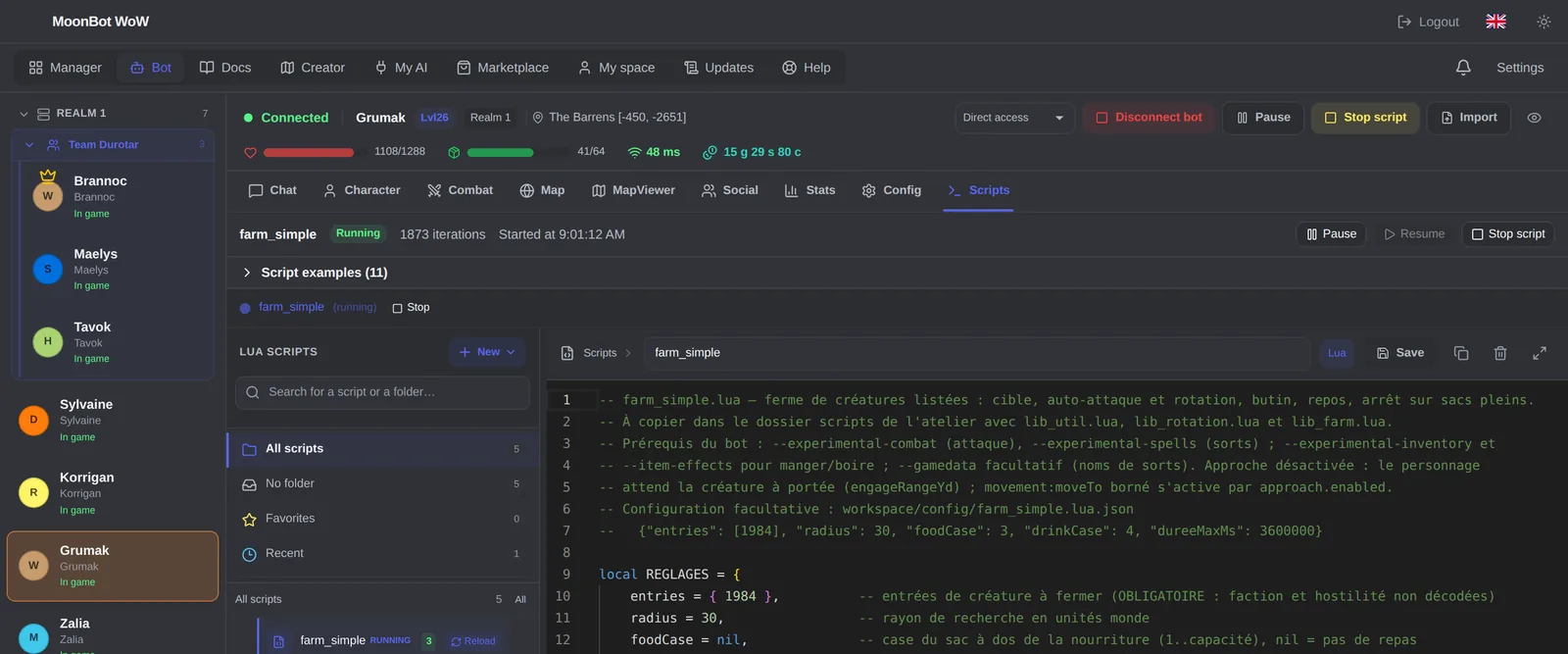
- each character runs its own script, written in Lua or built without code in the script creator.
The Manager: all your accounts on one screen
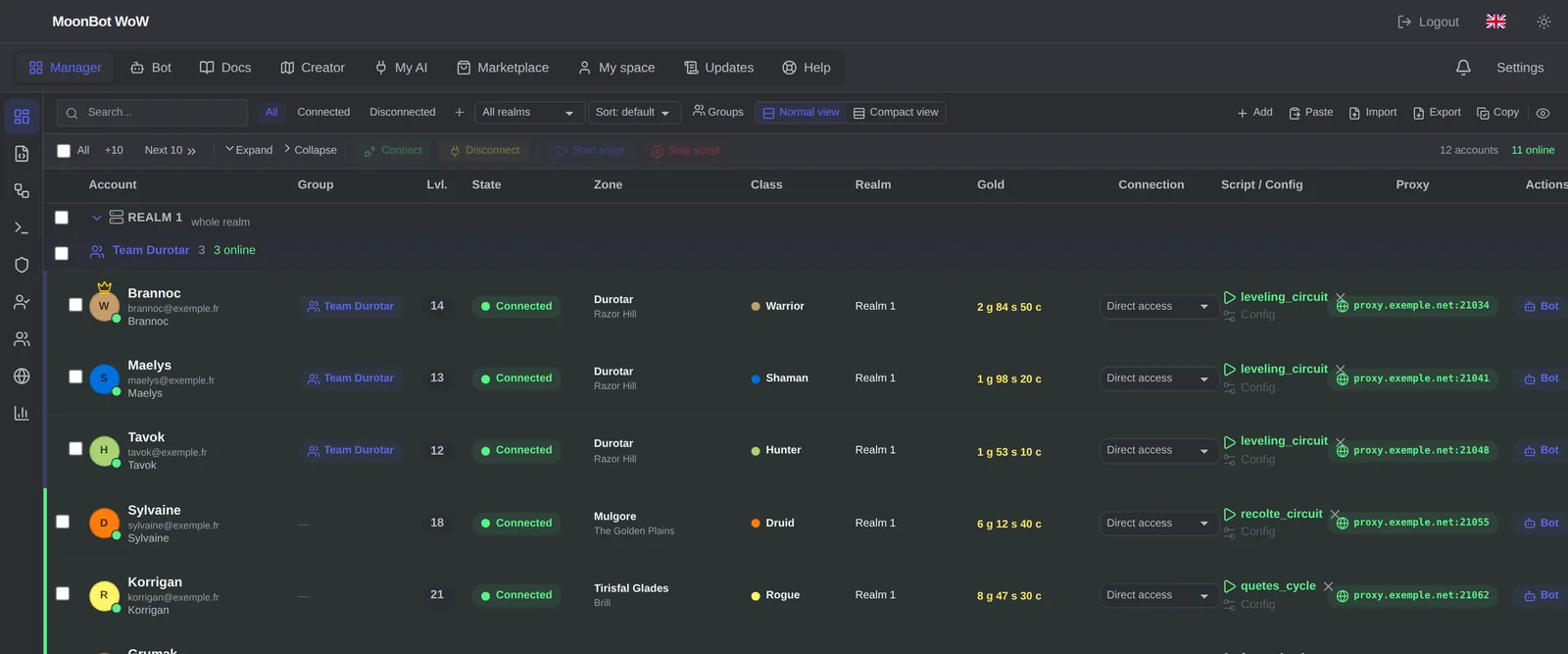
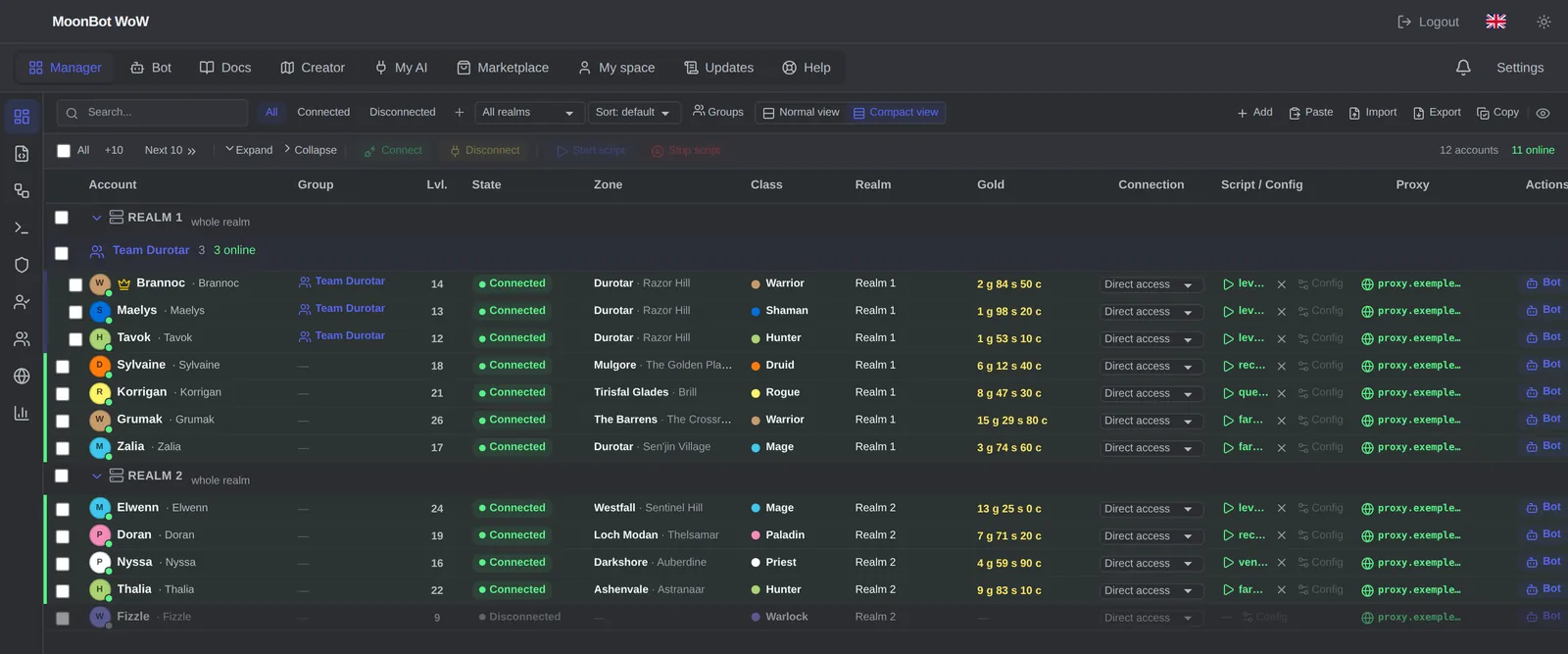
The Manager is the first tab of the app. It groups your accounts by realm and by group, and shows for each one its state, level, zone, class, gold, connection mode, script and proxy.
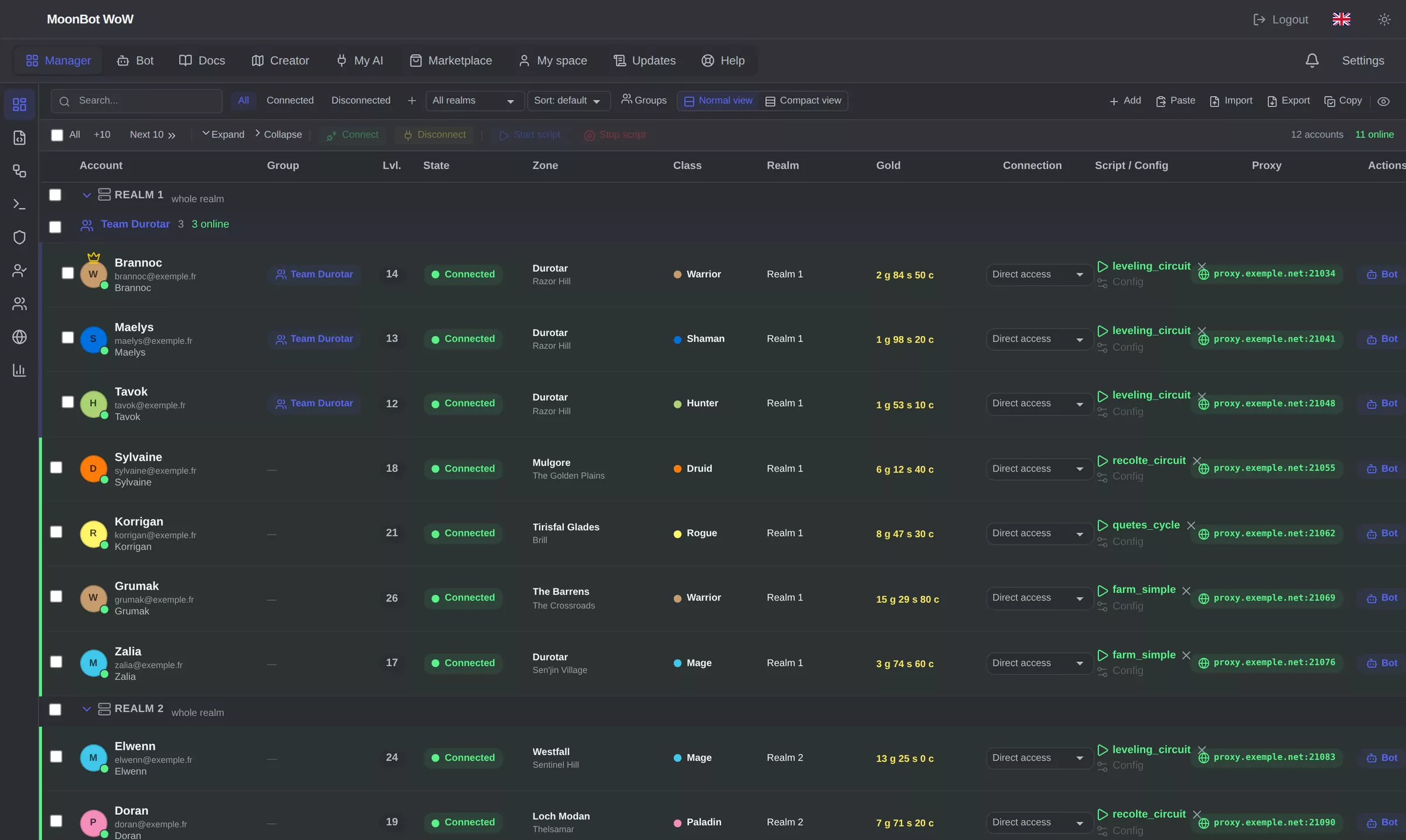
- Two views. The normal view details each account; the compact view fits one line per account, to see more of them on screen.
- Filter and search. A search field, and "Connected" and "Disconnected" filters.
- Select. All accounts, a whole realm, or in batches of ten.
- Act on the selection. "Connect", "Disconnect", "Start script" and "Stop script" apply to every ticked account.
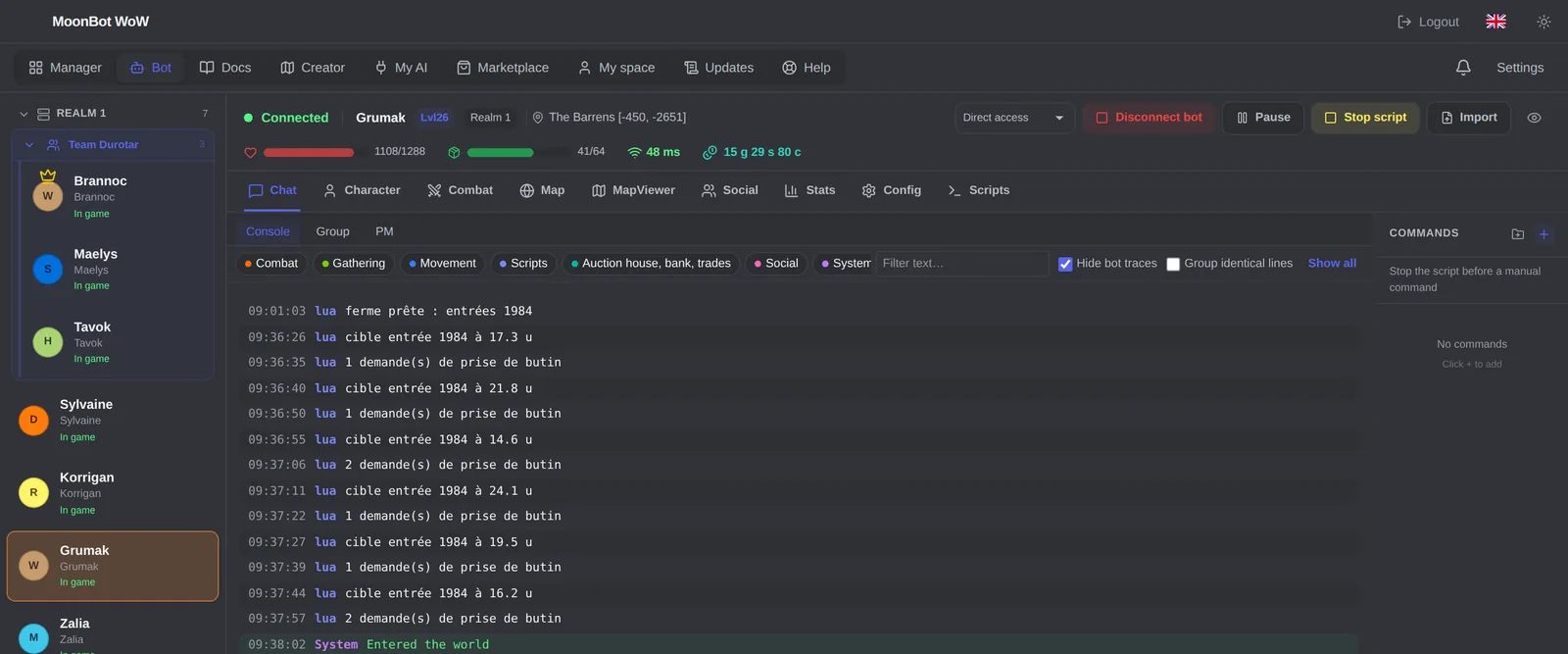
- Open a bot. One click leads to its page: console, character, combat, config, scripts.
Setting up several accounts, step by step
- Choose a plan by the number of game accounts: 5, 15, 40 or unlimited (see pricing). That number applies both to the accounts you add and to the bots running at the same time. The free account runs no game account.
- Add your game accounts in the Manager.
- Assign a proxy to each account (HTTP, HTTPS or SOCKS5), in Manager › Proxies. You use your own, or you buy Proxy France or Proxy Spain in the app (Marketplace › Shop): each proxy you buy is added to your list by itself. Without an active proxy, the bot does not connect.
- Choose the connection mode of each account, in the "Connection" column: with "Direct access", the bot enters the game on its own with the character whose name you give; with "Choose character", it stops at the character screen and lets you choose.
- Create the missing characters from the site, in Manager › Character: race, sex, class, appearance, given name and family name. Each bot then creates its character itself, after your confirmation.
- Give each account a script: a script from your library, a script built in the script creator, or an adapted example (see rotation and mob farming on WoW Forever).
- Tick the accounts, then "Connect" and "Start script".
In-app proxies. A Proxy France or a Proxy Spain is paid with your MoonBot WoW balance, which you top up by card or in crypto, for one month, with no automatic renewal: you extend it by a month whenever you want. You can ask for a new IP up to 10 times a month (the "New IP" button of the Manager). It only works for World of Warcraft.
Groups: up to five accounts together
The Groups tab of the Manager brings together one to five accounts: it is a party of the game, never a raid. An account belongs to one group only, and you pick a leader among the members. You start the same script on each account: the leader's script decides, the others follow it, hit its target and do the quests with it.
Group play is written and tested out of game, but it has not been seen working in game yet. For now, count on accounts that each play on their own: combat, looting, resting and selling to the vendor are what has been seen working in game.
Following several accounts without spending the day on it
- Each bot's console, live, with filters by family (combat, gathering, movement, scripts).
- Statistics, recorded per day: the XP and gold earned per bot and per realm.
- Two Discord alerts: "Script stopped on its own" and "Bot disconnected and stopped".
- My AI: your own assistant (Claude, ChatGPT or another MCP client) can diagnose your bots, start and stop them, and list, test and assign your proxies. Count 1,000 actions a day on Beginner, 3,000 on Standard, with no limit on Pro and Expert.
- The phone: the interface opens in a phone's browser, Manager included.
How many accounts, and at what price?
| Plan | Game accounts | Per month | Per account per month | One in-app proxy, per month | Yearly (30% off) |
|---|---|---|---|---|---|
| Beginner | 5 | €49.99 | ≈ €10.00 | €2.20 | €419.92 |
| Standard | 15 | €99.99 | ≈ €6.67 | €2.00 | €839.92 |
| Pro | 40 | €189.99 | ≈ €4.75 | €1.80 | €1,595.92 |
| Expert | Unlimited | €500 | — | €1.60 | €4,200 |
The bigger the plan, the less an account costs, and the less the in-app proxy costs. You need one proxy per game account: your own, or the app's. There is no free plan and no trial. The full grid, with what each plan includes, is on the MoonBot WoW Forever bot page; the other bots on the market are in our WoW Forever bot comparison.
The limits to know with several accounts
- Groups. Not yet seen working in game, and never more than five accounts: no raid.
- Dungeons. No: the bot does not move inside an instance.
- Death of a character. Its script stops; you resurrect it (the "Resurrect at the graveyard" button if the spirit healer is very close, otherwise in game), then start the script again.
- One script at a time per bot.
- Updates. After a bot server update, you restart your bots yourself.
- Proxies. One per game account: your own, or the app's, which only work for World of Warcraft.
How to get started
- Create your account on wow.moon-bot.io, with a username and a password or in one click with Discord.
- Choose a plan in My space › Subscription.
- Add your game accounts in the Manager and assign a proxy to each.
- Give each account a script, then tick them and click "Connect" and "Start script".
A question? The MoonBot Discord is there to help. MoonBot also runs several accounts on Ankama's games: see multi-account play on Dofus 3.